

GoldBot Air & SideKick
"Make Trading EA-Sier"
Automated XAUUSD trading for MetaTrader 5 — one licence key works in every GoldBot EA
The Smarter Way to Trade XAUUSD Automatically
GoldBot Air is a fully automated Expert Advisor for MetaTrader 5 built specifically for Gold (XAUUSD) trading. It combines a proven recovery sequence engine with intelligent trend detection, EMA and ADX indicator confirmation, partial recovery management, and a beautiful real-time dashboard — all working together to protect your capital and grow your account consistently.
Unlike simple grid or martingale bots, GoldBot Air uses multi-layer intelligence: it reads the market direction before opening trades, pauses when trends are unfavorable, and resets gracefully at configurable profit targets.
Version 2.2
Major Upgrades
Every system has been rebuilt, refined, or newly added in v2. Here is what changed from the ground up.
Everything Built Into GoldBot Air
Three-Layer Trend Detection
Combines EMA direction, ADX strength threshold, and consecutive loss counter into a single intelligent pause decision. All three signals must agree before blocking a side — eliminating false pauses in ranging markets.
NEW IN v2Smart Recovery Sequence Engine
Three-stage lot multiplier (Fast → Medium → Slow) grows position size intelligently through Early, Mid, and Late stages with configurable multipliers and lot thresholds. Max lot cap prevents runaway exposure.
ENHANCEDDynamic Profit Protection
Activates at a configurable profit threshold, then trails upward in steps. Two modes: Trail and Lock (closes when profit drops to level) or Instant Reset (closes and restarts immediately on activation).
ENHANCEDPartial Recovery System (PR)
Monitors open recovery trades and closes partially at a configurable percentage of the TP or at a fixed price movement — whichever comes first. Reduces accumulated loss and steps back the sequence, making recovery faster and safer.
ENHANCEDPredefined Loss Recovery Start
Start the EA mid-recovery at any accumulated loss amount. The system calculates the correct sequence and lot size automatically. On auto-reset, the predefined loss is always restored — never corrupted by timing issues.
FIXED IN v2Tiered Pause System
Three configurable sequence thresholds trigger progressively longer pauses — 5 minutes at sequence 10, 15 minutes at sequence 15, 30 minutes at sequence 20. Includes a trade open delay after every close and an automatic deadlock breaker.
REBUILTMax Lot Auto Reset
When enabled, the EA automatically closes all trades and resets the system to predefined loss settings the moment the maximum lot size is reached during a recovery sequence — preventing runaway drawdown.
NEW IN v2GoldBot Cloud Dashboard Panel
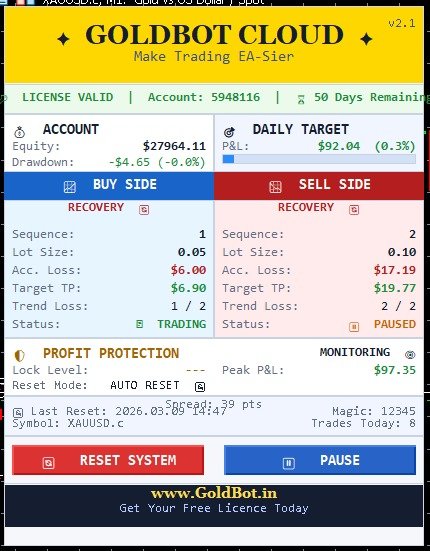
Beautiful real-time panel showing both BUY and SELL sides — sequence, lot size, accumulated loss, target TP, trend counter, status, profit protection state, daily P&L with progress bar, and license info. RESET and PAUSE buttons built in.
NEW IN v2Failsafe Physical Stop Loss
Optional emergency physical SL placed at a configurable price distance from entry — acts as a last resort backstop beyond the software loss threshold. Automatically adjusted to meet broker minimum stop level requirements.
BUILT-INHow GoldBot Air Makes Decisions
Read Market Indicators
Every tick, the EA reads the EMA value and ADX strength from the configured timeframe. This tells it whether a real trend exists and in which direction.
Check Loss Counter
Consecutive losses are tracked separately for BUY and SELL sides. When the threshold is reached, the indicator signals are checked before pausing a side.
Open or Block Trade
If the trend is confirmed by ADX + EMA AND the loss counter threshold is met, that side is paused. The other side continues trading normally.
Monitor for TP or Loss
Open trades are monitored each tick. TP is hit → sequence resets or advances. Loss threshold is hit → next recovery sequence opens at larger lot.
Partial Recovery Fires Early
If the PR system is active and profit reaches the PR target, the trade closes partially — reducing accumulated loss and stepping back the sequence before full TP.
Profit Protection Resets
When daily profit hits the protection threshold, the EA can trail upward and lock, or immediately reset and restart — depending on your configuration.
📊 Trend Detection Stack
Three independent signals — all must agree to pause a side🔄 Recovery Logic
Lot size grows in three configurable stagesFive Layers of Protection
Dynamic Profit Protection
Activates when profit reaches a threshold (e.g. 15% of daily target). Trails upward in configurable steps. Locks profit when market reverses. Optional instant-reset mode closes and restarts the EA immediately upon activation without waiting for a pullback.
Daily Profit & Loss Limits
Set a daily profit target percentage and a daily loss limit percentage. When either is hit, the EA closes all trades and stops for the day — restarting fresh at midnight with a new equity baseline.
Trend-Based Pause System
When a losing trend is confirmed by EMA, ADX, and the loss counter, the losing side is paused automatically. The opposite side continues trading. A deadlock breaker prevents both sides from being paused indefinitely.
Max Lot Auto Reset
When the EA reaches the maximum configured lot size during a recovery sequence, it can automatically close all positions and reset the system back to predefined loss settings — preventing account-level drawdown from a single bad streak.
Failsafe Physical Stop Loss
An optional emergency physical SL is placed on every trade at a configurable price distance. This is a last resort — much wider than the software threshold — to protect against broker disconnections, platform crashes, or internet outages.
Partial Recovery System
Instead of waiting for a full TP that may never come, the PR system captures partial profit at configurable intermediate levels — reducing accumulated loss and stepping back the recovery sequence to a lower, safer position.
The GoldBot Cloud Panel
The built-in GoldBot Cloud panel gives you a complete real-time view of everything happening inside the EA — no need to dig through logs. It updates every tick and stays fixed on your chart.
BUY & SELL Side Cards
Sequence number, lot size, accumulated loss, target TP, trend loss counter, and trading status displayed side by side for instant comparison.
Daily P&L with Progress Bar
Shows floating P&L in dollars and percentage alongside a visual progress bar toward your daily target. Color-coded green/red in real time.
Profit Protection Status
Live protection level, peak P&L, lock mode, and whether protection has triggered today — all visible at a glance.
License & System Info
License validity, account number, days remaining, spread, magic number, symbol, trades today, and last reset time.
RESET Button
One-click system reset from the panel — closes all trades, alerts with confirmation, and restarts at predefined loss settings instantly.
Key Input Settings Reference
Profit Settings
5 inputsTrend Detection
6 inputsRisk Growth (Lot Stages)
7 inputsProfit Protection
6 inputsWhat You Need to Get Started
Platform
MT5Built for MetaTrader 5. Legacy v1.6 is also available for MT4.
Instrument
XAUUSDOptimised for Gold. Works on most brokers' XAUUSD symbol.
Min. Capital
$1,000Recommended $3,000+ for recovery sequences with buffer.
Timeframe
M5 / M15M5 recommended for indicators. EA monitors on every tick.
Broker Type
ECNLow spread ECN/Raw accounts recommended. Avoid wide-spread accounts.
VPS
Recommended24/7 uptime is critical. Use a VPS with low latency to your broker.
Spread
< 25 ptsUnder 25 points on XAUUSD for optimal trade execution.
Meet GoldBot SideKick
SideKick is the next Expert Advisor in the GoldBot family. It is being tested on our own live XAUUSD account right now — the same account you can follow in the GoldBot App.
- Runs on MetaTrader 5, built for XAUUSD
- Uses your existing GoldBot licence key — no new application
- Download appears in My Licence on launch day
Register, Apply, Get Your Key
Licences are issued to registered GoldBot accounts. Your key and downloads live in your account, so you can find them again any time.
Create an account
Name, email and a password. The same login works in the GoldBot App.
Apply for a licence
Pick a plan and enter your MetaTrader account number.
Get your key & download
Once approved, copy your key from My Licence, download the EA and start trading.
Partner Broker — Free
Free for accounts opened through our partner broker links. Renewed free while you trade.
Free Trial — Any Broker
One free trial per person on any broker. Full features, no payment.
Instant Demo
Pay a small USDT fee and skip the queue. Any broker.
Weekly Licence
Any broker, live or demo. Paid in USDT.
Monthly Licence
Any broker, live or demo. Best value. Paid in USDT.
Already registered? Log in
Download GoldBot EAs
Log in to download. Accounts are free, and you need a licence key to activate the EA.
Install & Activate on MetaTrader 5
Get a GoldBot EA running in about five minutes. The steps are the same for GoldBot Air and SideKick.
📥 Download the EA
From the Downloads section above (or My Licence), download GoldBot Air v2.2 — MT5 .ex5 and unzip it.
📂 Open the data folder
In MetaTrader 5 click
File → Open Data Folder, then openMQL5 → Experts.📋 Copy the file
Paste
GoldBotAir_v22.ex5into the Experts folder, then fully close and reopen MT5.⚙️ Allow algo trading
Tools → Options → Expert Advisors: tick Allow algorithmic trading. Turn on the Algo Trading button in the toolbar (it turns green).📈 Open an XAUUSD chart
Open Market Watch (
Ctrl+M), double-click XAUUSD and set the timeframe to M5.🔑 Attach & paste your key
Drag the EA from the Navigator (
Ctrl+N) onto the chart. In Inputs, paste your key into LicenseKey and click OK.✅ Check it's running
The GoldBot panel appears on the chart and the Experts tab (
Ctrl+T) showsLICENSE VALID.
🔍 EA not in the Navigator
- Fully restart MT5
- Check the file is in
MQL5 → Experts - Use the .ex5 file on MT5 (.ex4 is MT4)
🔑 Key not accepted
- Copy the key from My Licence — don't type it
- The key only works on the account number you applied with
- Check the expiry date in My Licence
🚫 No trades opening
- Algo Trading button must be green
- Market must be open and XAUUSD tradable
- Check free margin and the Experts tab for errors
GoldBot Air Supports 50+ Forex Brokers
Our automated XAUUSD trading bot is compatible with all major MT5 brokers worldwide
✅ GoldBot Air works with all MT4 & MT5 brokers offering XAUUSD trading. Get your free licence →
Ready to Trade Smarter?
Create your GoldBot account, apply for a free partner or trial licence, and run GoldBot Air on a demo account first.
Get GoldBot Air →